Getting started: Notification Setting
About Course
In the Online Notifications section, users can toggle settings for receiving notifications about new job recommendations, project recommendations, activity recommendations, status updates of their applications, their accepted applications, status changes by candidates, new applications, recommended candidates, and new online messages. This allows users to stay informed and engaged with relevant updates within the platform.
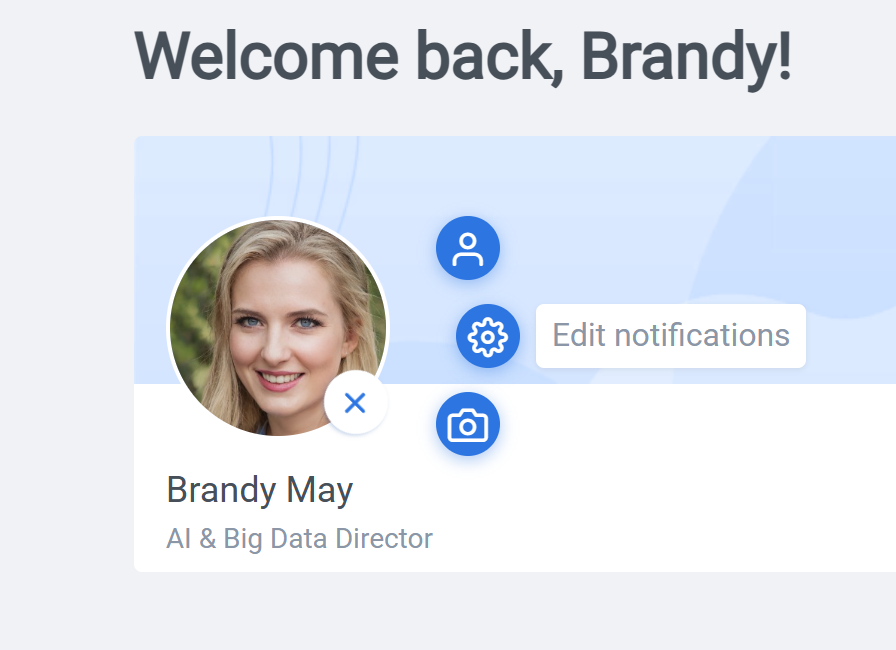
The setting page can be reached either by clicking on the plus sign on your avatar as seen above or clicking on your image on top and selecting “Edit notifications”.
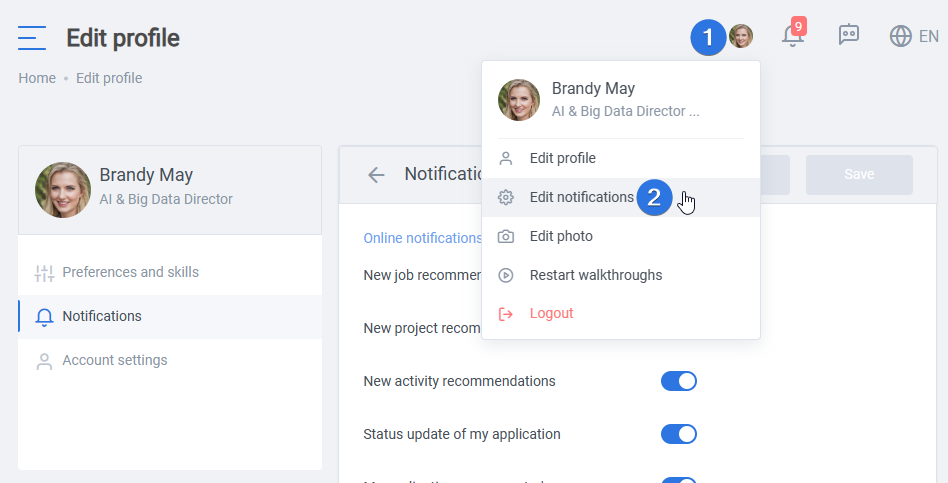
Users can customize their online and email notification preferences for various updates, recommendations, application statuses, and candidate-related notifications. Each switch setting allows users to opt-in or opt-out of specific notifications based on their preferences and needs.

In the Email Notifications section, users can personalize their preferences for receiving email notifications. This includes receiving personalized recommendations and status updates, being notified about the acceptance of their applications, receiving updates on candidates’ application statuses, and being informed about new candidate recommendations. These email notifications ensure that users stay informed even when they are not actively engaged on the platform.

In conclusion, the “Notification Settings” page offers users the ability to customize their online and email notification preferences based on their preferences. By selecting their desired settings, users can ensure they receive timely updates on job, project, and activity recommendations, application statuses, and candidate-related information, both within the platform and via email.
This level of customization enhances the user experience by providing relevant and personalized notifications.